Plug-ins › Mashup EFX
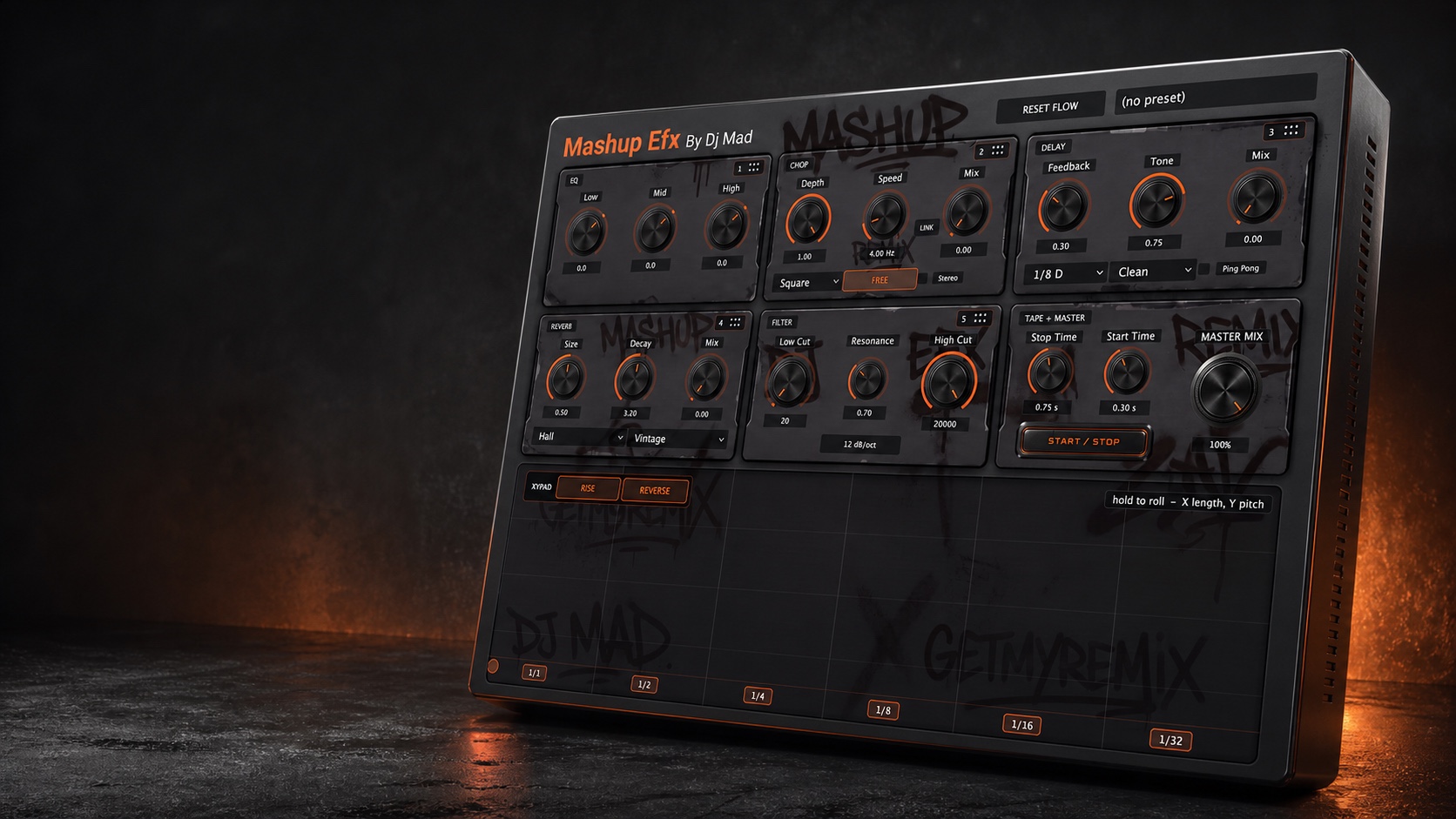
Mashup EFX 1.1 premium three-dimensional hardware render
3-Day Trial Available Performance multi-FX by DJ Mad

Mashup EFX

One playable effects console. Your signal flow.

Build club-ready transitions, stutters, tape stops, filter sweeps, delay throws, and moving textures from one compact plug-in—then drag the modules into the order that fits the moment.

XY-first performanceRoll, rise + reverse
Drag the signal flowFive movable modules
Tape transportIndependent stop + start
AU + VST3Apple Silicon + Intel
macOS 13+ · AU + VST3Available today for Apple Silicon and Intel Macs. Windows + AAX compatibility is coming soon.
Made to be performed

Turn ordinary sections into moments people remember.

Mashup EFX keeps the controls DJs reach for most in one visual performance surface, without making you build and automate a long chain of separate plug-ins.

01 / BUILD

Buildups + drops

Push tension with filters, rhythmic CHOP, delay feedback, and rising XY gestures—then release cleanly into the next section.
02 / CUT

Stutters + rolls

Use the XY pad and CHOP to turn sustained audio into musical repeats, gates, pulses, and hardware-style performance gestures.

03 / MOVE

Transitions

Combine high/low sweeps, delay throws, ambience, and tape transport to connect records or arrangement sections with intent.

04 / COLOR

Bring dead sounds alive

Add tone, space, stereo movement, timing, and character to sources that feel flat without burying the musical idea.

HOW IT WORKS
The 1.1 workflow

XY first. Your modules next. Tape + Master last.

The performance pad creates the initial gesture. Five processing modules can then be reordered to color that gesture differently, while tape transport and the final Master Mix remain safely anchored at the end.
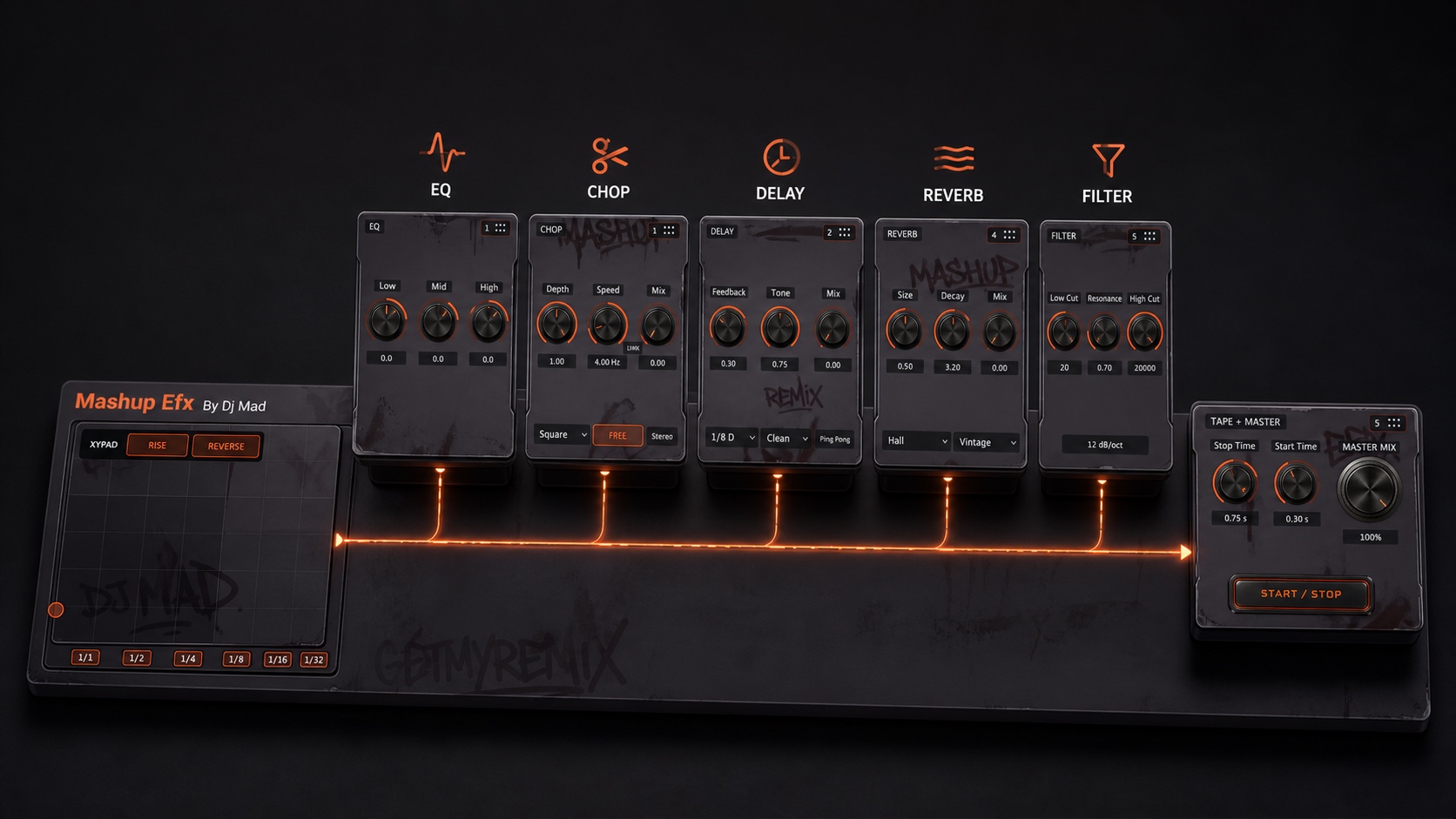
FIXED FIRSTXY Pad
DRAG 01EQ
DRAG 02CHOP
DRAG 03Delay
DRAG 04Reverb
DRAG 05Filter
FIXED ENDTape + Master
Fixed stages protect the performance entry and final output behavior.Movable stages drag by the six-dot handle; the ghost preview shows exactly where the module will land.
Mashup EFX modular 3D signal flow with XY pad first and Tape plus Master last
A chain that changes with the idea

Reorder the sound—not just the screen.

Putting CHOP before Delay creates repeating chopped motion. Moving Delay before CHOP gates the echoes themselves. Put Filter last to sweep the entire effect tail, or move it earlier to feed darker repeats into the rest of the chain.

Visible six-dot drag handlesNumbered positions keep the current processing order readable at a glance.
Ghost placement feedbackThe destination lights up before you release the module.
Complete Reset AllRestore every parameter, bypass state, and module position with one click.
Seven performance sections

A complete transition toolkit in one window.

Every module has a clear job, starts neutral or dry where appropriate, and now includes its own dedicated bypass for instant A/B checks without losing the module’s settings.

Fixed first

XY Roll Performance

Hold the pad to roll. X selects the musical length; Y moves pitch. Rise and Reverse begin ready, while visible divisions make the performance area immediately understandable.

1/1 · 1/2 · 1/4 · 1/8 · 1/16 · 1/32
Movable

Three-band DJ EQ

Shape lows, mids, and highs with immediate DJ-style control. Move the entire EQ earlier or later in the effects chain depending on what you want it to influence.

Low · Mid · High
Movable

CHOP

Create gates, pulses, stutters, and stereo motion. Square is the musical default, Speed starts in free mode, and Depth starts at 100% while Mix remains off until you bring it in.

Free + sync · Sine / Triangle / Square · Stereo
Movable

Performance Delay

Build clean, tape, or lo-fi repeats with feedback, tone, mix, and optional ping-pong motion. The default dotted-eighth setting is ready for immediate rhythmic movement.

1/8 D default · Dotted + triplet divisions
Movable

Character Reverb

Choose Plate, Room, or Hall and Modern, Vintage, or Dark character. Size, Decay, and Mix keep throws and transition tails fast to shape.

Plate / Room / Hall · Modern / Vintage / Dark
Movable

Dual Filter

Dedicated Low Cut and High Cut controls share a centered Resonance control for wide DJ sweeps, focused movement, and clean transitions without mode switching.

12 or 24 dB/oct · Shared resonance
Fixed end

Tape Start / Stop

Press one performance button to slow the source to a stop or restart it with pitch acceleration—not a simple volume fade. Set stop and start timing independently.

Independent Stop Time + Start Time
Final output

Master Mix

Blend the complete processed chain against the untouched input from one oversized final dry/wet control. It stays at the end regardless of module order.

0–100% global dry/wet
Performance control

Offset-aware LINK

Link CHOP Speed and Mix from their current positions. The relationship is preserved instead of forcing both controls to the same value.

Link from the sound you already created
The real production interface

See the complete 1.1 build.

Choose a view to inspect the exact released layout, the modular architecture, a custom module order, and the final Tape + Master controls.
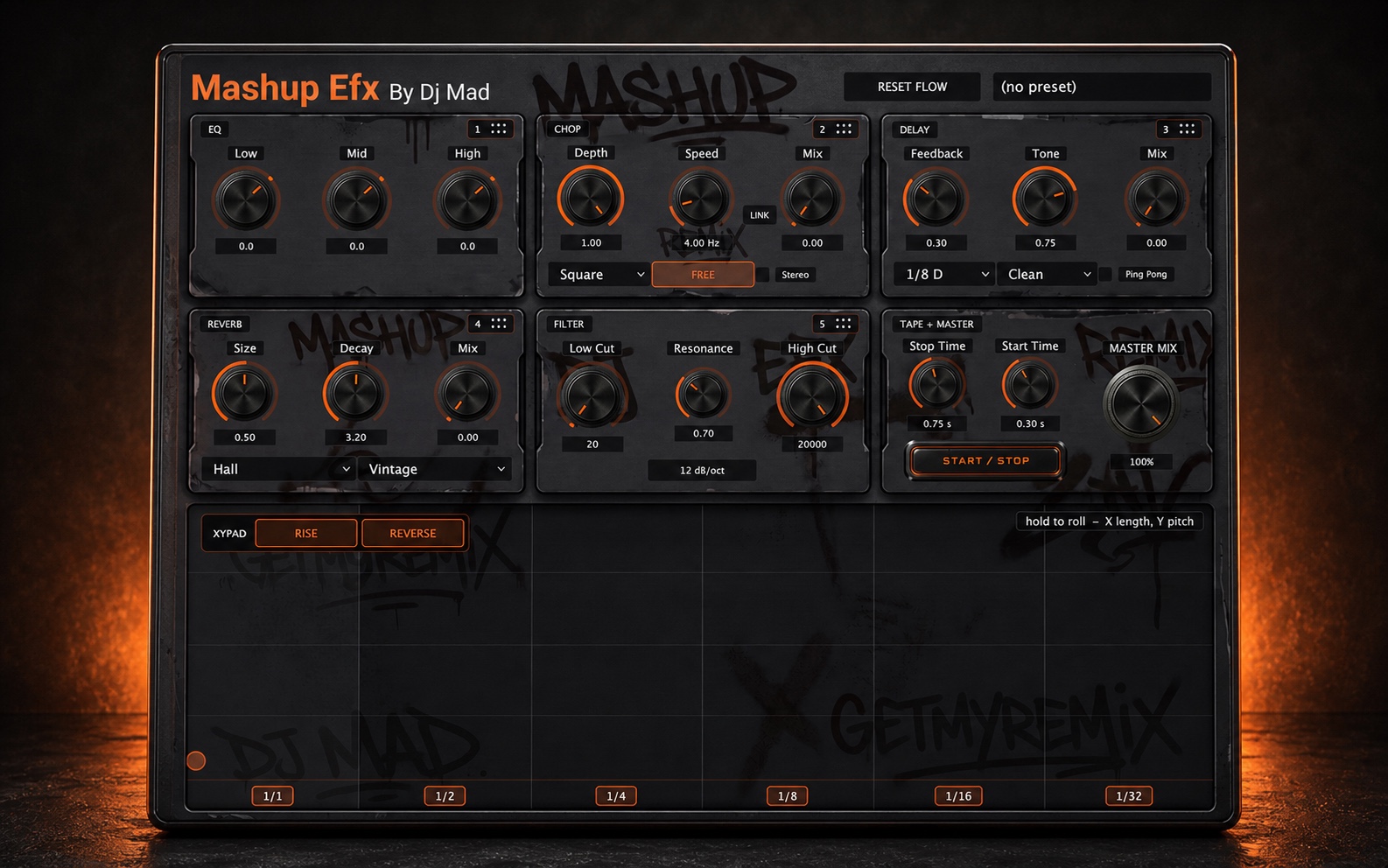
Complete hardware interface
Complete hardware interfaceThe current 1.1 design presented as a premium front-facing hardware unit.
A fast creative workflow

From source to finished transition in four moves.

1

Perform the gesture

Start with the XY pad for a roll, rise, reverse, and pitch-moving transition gesture.

2

Build the chain

Bring in CHOP, Delay, Reverb, EQ, and Filter, then drag them into the order that creates the response you want.

3

Finish the motion

Use Tape Start / Stop for transport-style transitions and Master Mix to blend the complete effect against the original source.

4

Make it playable

Automate supported parameters or map them through your DAW to MIDI knobs, faders, pads, and performance hardware.

Built for the session

Fast enough to perform. Organized enough to recall.

Mashup EFX is designed for responsive real-time control in live and studio workflows. One focused interface reduces the friction of managing a long chain of independent effects.

Neutral until you moveDry/off module defaults avoid an unexpected level or tonal jump when the plug-in is inserted.
Resizable without distortionThe interface preserves its aspect ratio so modules, labels, and hit areas remain aligned.
Complete session recallControls, module order, active modes, preset choice, and editor size return with the session.
Mashup EFX 1.1 complete production interface
Release 1.1.1 · September 1, 2026

Now available as a secure three-day trial.

Version 1.1.1 lets you test-drive the complete Mashup EFX workflow on your own music before purchasing, using the same signed installer for trial and paid activation.

What’s new in 1.1.1

  • Secure, full-featured three-day trial with no credit card required.
  • The trial timer begins only after the first successful serial activation.
  • One installer accepts either a trial serial or a paid Mashup EFX serial.
  • Existing paid Mashup EFX serials remain fully compatible.
  • After trial expiry, effects processing stops safely and audio passes through unchanged until a paid serial is activated.
  • Apple-signed and notarized universal AU and VST3 installer for supported Apple Silicon and Intel Macs.
Release 1.1.0 · August 23, 2026

Faster control in the middle of a performance.

Version 1.1 adds independent bypass control across the complete signal flow, making it faster to compare, perform, and recover a sound without changing its settings.

What’s new in 1.1.0

  • Dedicated bypass controls for XY Roll, EQ, CHOP, Delay, Reverb, Filter, and Tape + Master.
  • Smooth bypass transitions designed to avoid clicks while preserving every module setting.
  • Effect tails remain intact so re-enabling Delay or Reverb does not rebuild the sound from zero.
  • New illuminated Start/Stop on and off states for clearer tape-transport feedback.
  • RESET ALL restores every parameter, bypass state, and module position to the factory workflow.
  • Bypass choices, module order, controls, modes, and editor size return with the DAW session.
  • Transparent pass-through verification when every processing section is bypassed.
  • Signed universal AU and VST3 release for Apple Silicon and Intel Macs.

Everything that matters, at a glance.

  • Independent bypass for every processing section
  • XY hold-to-roll pad with musical divisions
  • Rise and reverse pitch movement
  • Drag-reorderable five-module signal flow
  • Ghost placement and complete Reset All
  • Three-band DJ EQ
  • Independent Low Cut and High Cut filters
  • 12/24 dB filter slope and shared resonance
  • CHOP with Free and synchronized rate
  • Square, Triangle, and Sine CHOP waveforms
  • Offset-aware Speed/Mix LINK
  • Dotted and triplet delay divisions
  • Clean, Tape, and Lo-Fi delay characters
  • Optional ping-pong stereo delay
  • Plate, Room, and Hall reverb spaces
  • Modern, Vintage, and Dark reverb color
  • Tape stop and pitch-accelerated restart
  • Independent tape stop/start timing
  • Illuminated Start/Stop on and off states
  • Final 0–100% Master Mix
  • DAW automation and MIDI mapping
  • Fixed-ratio resizing and session recall
  • Signed AU + VST3 installer
  • Apple Silicon + Intel Mac support
Build it. Move it. Perform it.

Make the transition part of your sound.

One performance console. Your module order. No dead space.

Try Free for 3 Days
Official documentation

Learn it. Install it. Keep it current.

Quick start, complete controls, activation help, compatibility, and every published update are organized in one mobile-friendly guide.

Open user guideRelease notes

More GetMyRemix plug-ins

Selecciona una pista para escuchar
0:000:00
Instagram